

Brainstorming
Decisions
Record what the team agreed to do, any content it affects, who is responsible, and how far it has been applied.
A decision records what your team agreed to do after exploring: one verb, a conclusion, and the notes or groups it came from. It can name the content it affects, so the people who work on that content can see the agreement, apply it, and say when it is done.
Decisions are optional. Nothing in a session creates or accepts a decision automatically: grouping notes, writing a synthesis, or closing a round never does.
What a decision contains
| Field | Required | What it holds |
|---|---|---|
| Sources | Yes | The shared notes and groups the decision comes from, between 1 and 20. The version you consulted is kept with the decision. |
| Conclusion | Yes | What was agreed, in plain words. The title is derived from its first sentence or line, up to 160 characters, until you edit the title yourself. |
| This decision means we will | Yes | One verb: Create, Change, Test, Keep, or Discard. |
| Affects | No | Up to five Sheets, Flows, or Scenes the decision changes. For something that does not exist yet, choose Something new… and give it a label and a type. |
| Reason | No | Why the team chose this. |
| Responsible person | Yes | The editor who accepts the decision. The session’s decision owner is suggested by default. |
| Next action | No | What happens next in the editor, and optionally who does it. |
| Replaces a decision | No | An accepted decision of the same session that this one supersedes when it is accepted. |
The verb tells everyone what to expect:
| Verb | Meaning |
|---|---|
| Create | Something new is created in the content. |
| Change | Existing content is edited to match. |
| Test | A prototype or playtest before committing. |
| Keep | Confirms what already exists; usually nothing to apply. |
| Discard | Rules an option out; usually nothing to apply. |
Propose a decision
You can start a decision in three ways:
- From a selection. Select shared notes on the canvas and choose Propose a decision in the selection toolbar. The selection becomes the sources.
- From a group. Select a group and choose Turn into decision on its header. The group becomes the source and its synthesis fills in the conclusion.
- From the panel. Open Decisions in the header, select New proposal, and use Add sources to search the session’s shared notes and groups.
While the form is open, the same toolbar button reads Add to the proposal: select more notes and use it to add them as sources.
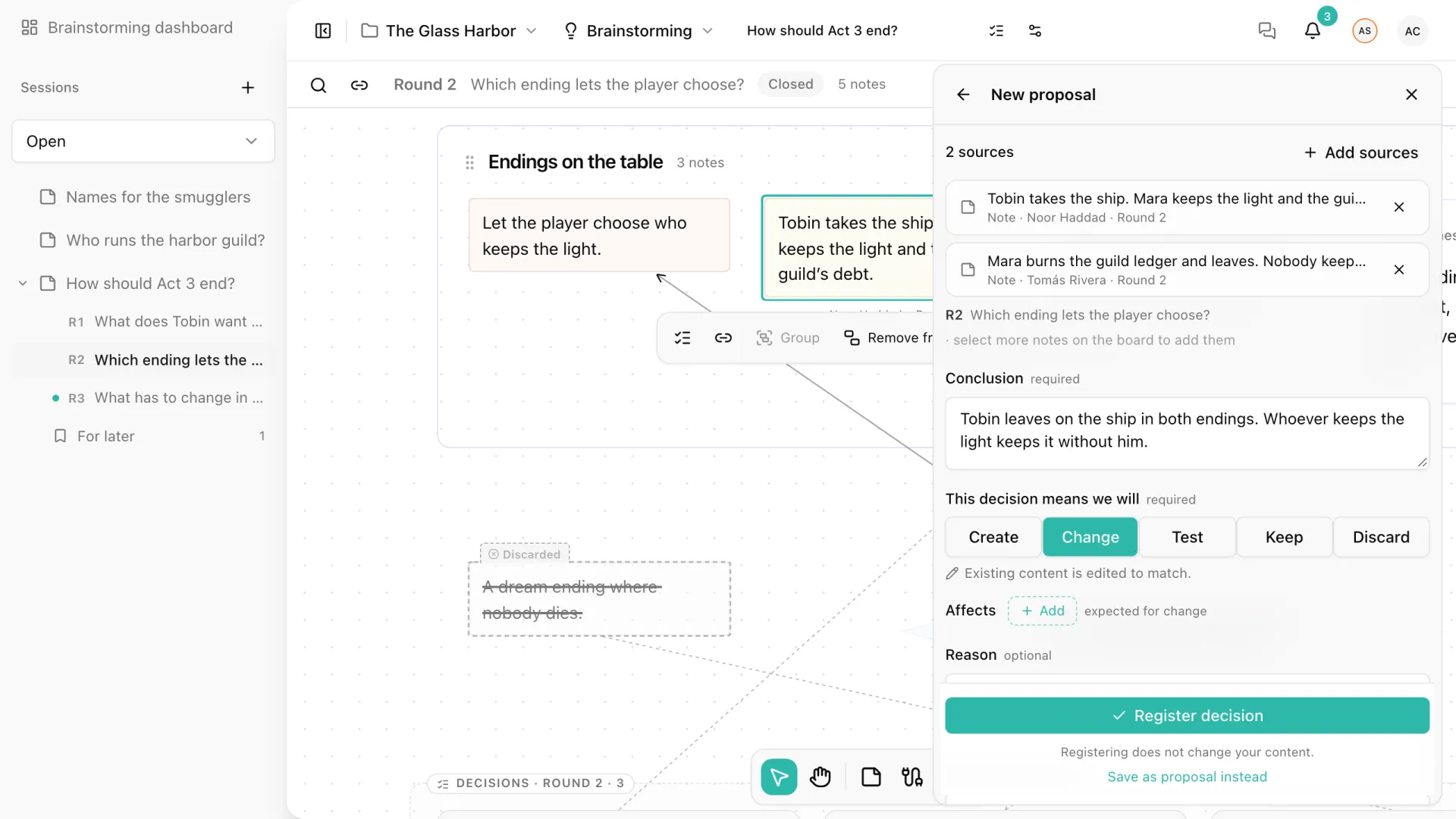
Only notes that are already shared can be sources. Notes of a private round become available once the round is revealed.
Register or propose
What the main button does depends on who is responsible:
- Register decision appears when you are the responsible person. The decision is proposed and accepted in one step.
- Propose appears when someone else is responsible. The decision waits for them, marked Waiting for you in their panel, and they get a notification in their inbox.
If you are responsible but want the team to review first, choose Save as proposal instead. Registering or proposing never changes your content.
Only the responsible person can accept a proposal, with Accept decision in its detail. Being the project owner, the facilitator, or the session’s decision owner does not allow you to accept on someone else’s behalf. There is no voting and no rejection: a proposal the team does not want is withdrawn.
The decisions panel
Decisions in the header opens the panel for the session. Decisions are listed by what needs attention: those waiting for you, those still to apply, open proposals, and finally those that are done. Withdrawn and superseded decisions are kept at the end under Retired.
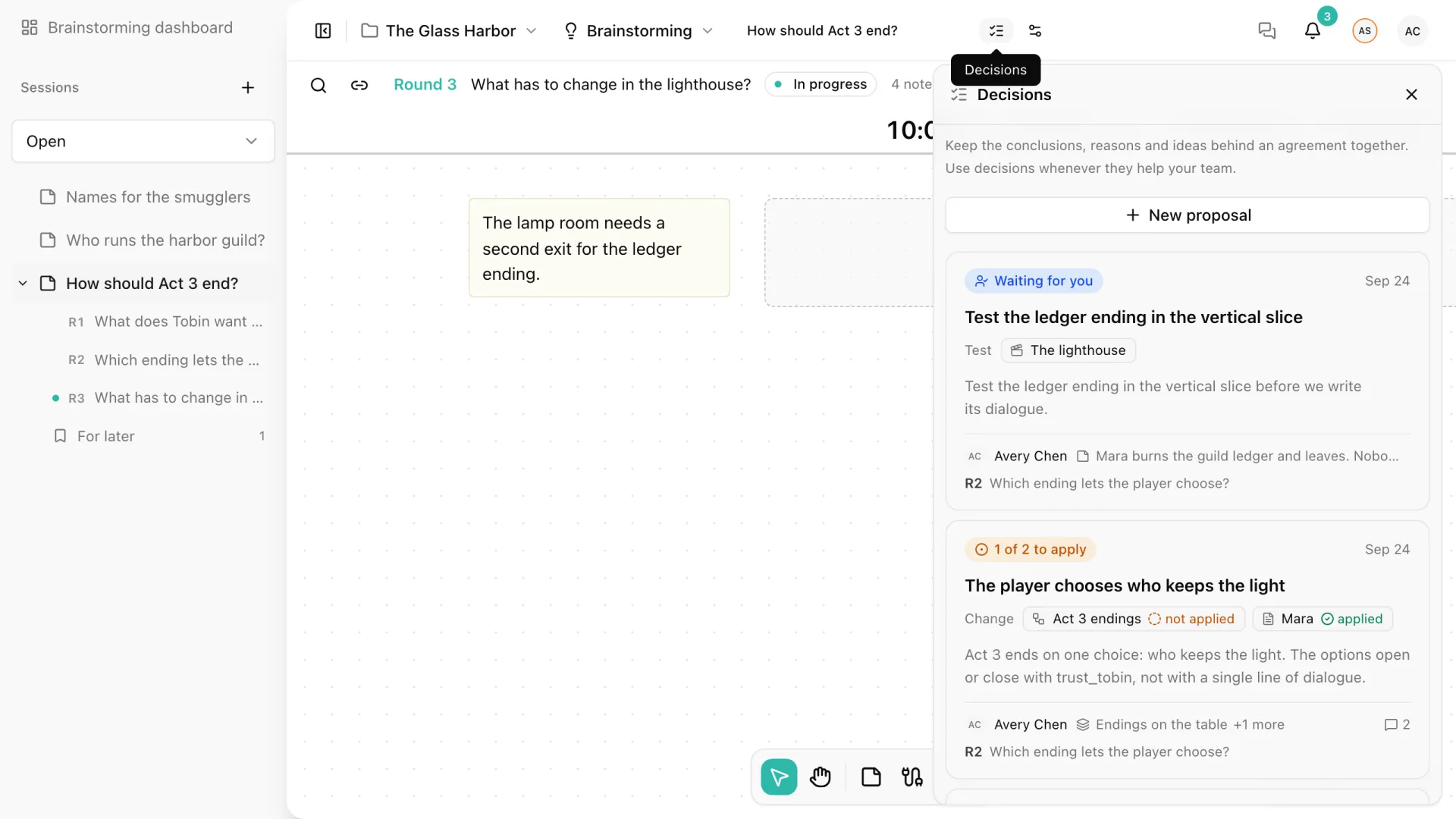
Each card shows one status: Waiting for you, Proposal, Accepted decision, 1 of 2 to apply, Withdrawn, or Superseded. It also shows the verb, the affected content with its application state, the sources, and the round the decision belongs to.
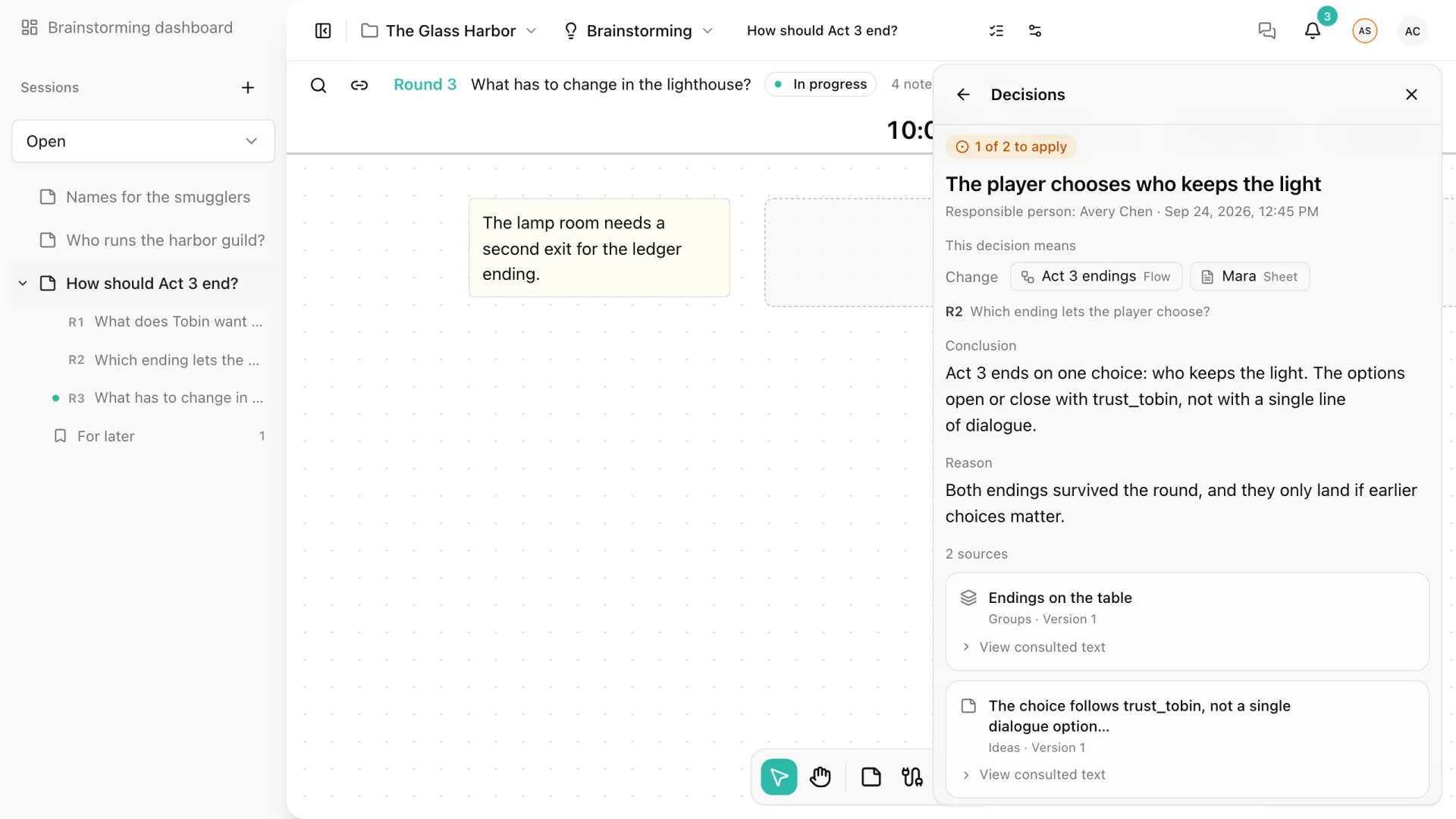
Open a card to see the whole decision: what it means, the round question, the conclusion and reason, and each source with the exact text consulted. If a source note has changed since, it is marked. When you propose a revision, Update sources adopts the current version of those notes.
Application
An accepted decision tracks, for each piece of content it affects, whether the change has been made:
| State | Meaning |
|---|---|
| Not applied | Nothing has been declared yet. This is the default. |
| Partially applied | Part of the change is in the content. |
| Applied | The change is in the content. |
| No change needed | The content already matched, or needs nothing. |
Any editor can declare a state with Mark applied, optionally with a short note such as “Added trust_tobin as a three-state select.” Go apply opens the affected content with the decision beside it; see Decisions in Your Content. A decision without affected content can be closed with Declare no change needed.
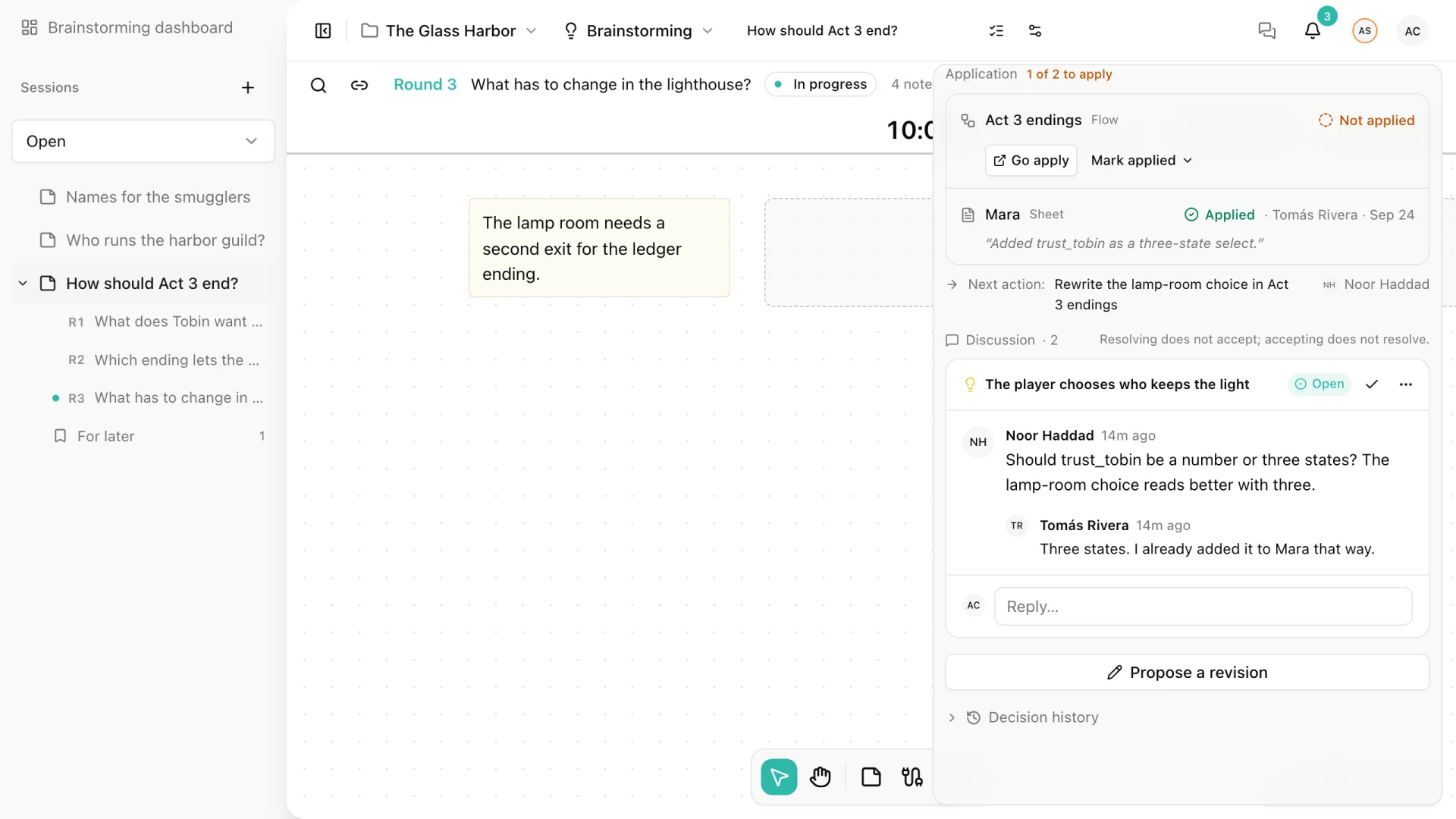
A declaration is a statement from your team, not a check: Storyarn never reads or changes the content to verify it, and never applies a decision automatically. Every declaration stays in the decision’s history with who made it and when.
Discuss a decision
Each decision has its own Discussion under the application block. Ask questions, mention teammates with @, and resolve the thread when it is settled. Cards show how many messages a discussion has.
Discussing and deciding are separate on purpose: resolving the discussion never accepts the decision, and accepting the decision never resolves the discussion.
Revise, withdraw, or replace
Decisions are never deleted or rejected. They change through new records, and the Decision history keeps every one of them.
- Propose a revision writes a new version of an accepted decision. The earlier agreement stays in force until the revision is accepted. Accepting it starts application over: every affected piece of content goes back to Not applied, and the earlier declarations stay in the history.
- Withdraw is available to the person who wrote the current proposal and to the project owner. Withdrawing a revision keeps the earlier agreement in force. Withdrawing a proposal that was never accepted retires the decision as Withdrawn.
- Replaces a decision, in the form, names an accepted decision of the same session. When the new decision is accepted, the old one becomes Superseded: read-only, and linked to its replacement.
Decisions on the canvas
Each round ends in a lane with the decisions that came from it, labeled like “Decisions · Round 2 · 3”. Cards appear in the same order as in the panel, with thin connectors to the sources you can see.
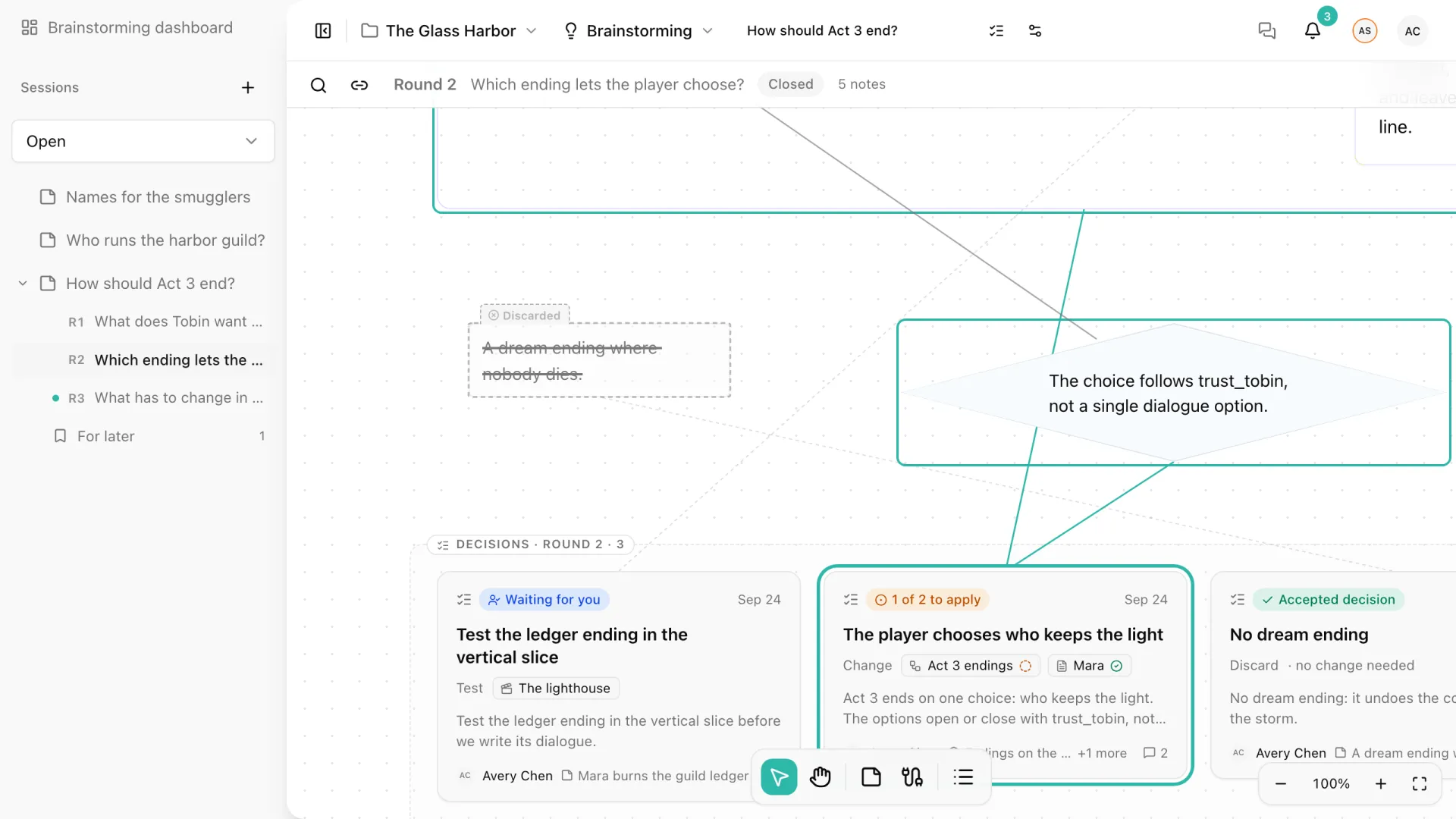
- Select a card to outline its sources on the canvas.
- Double-click a card, or press Enter, to open it in the panel.
- Rest the pointer on a note to see the decisions it supports, and choose one to open it.
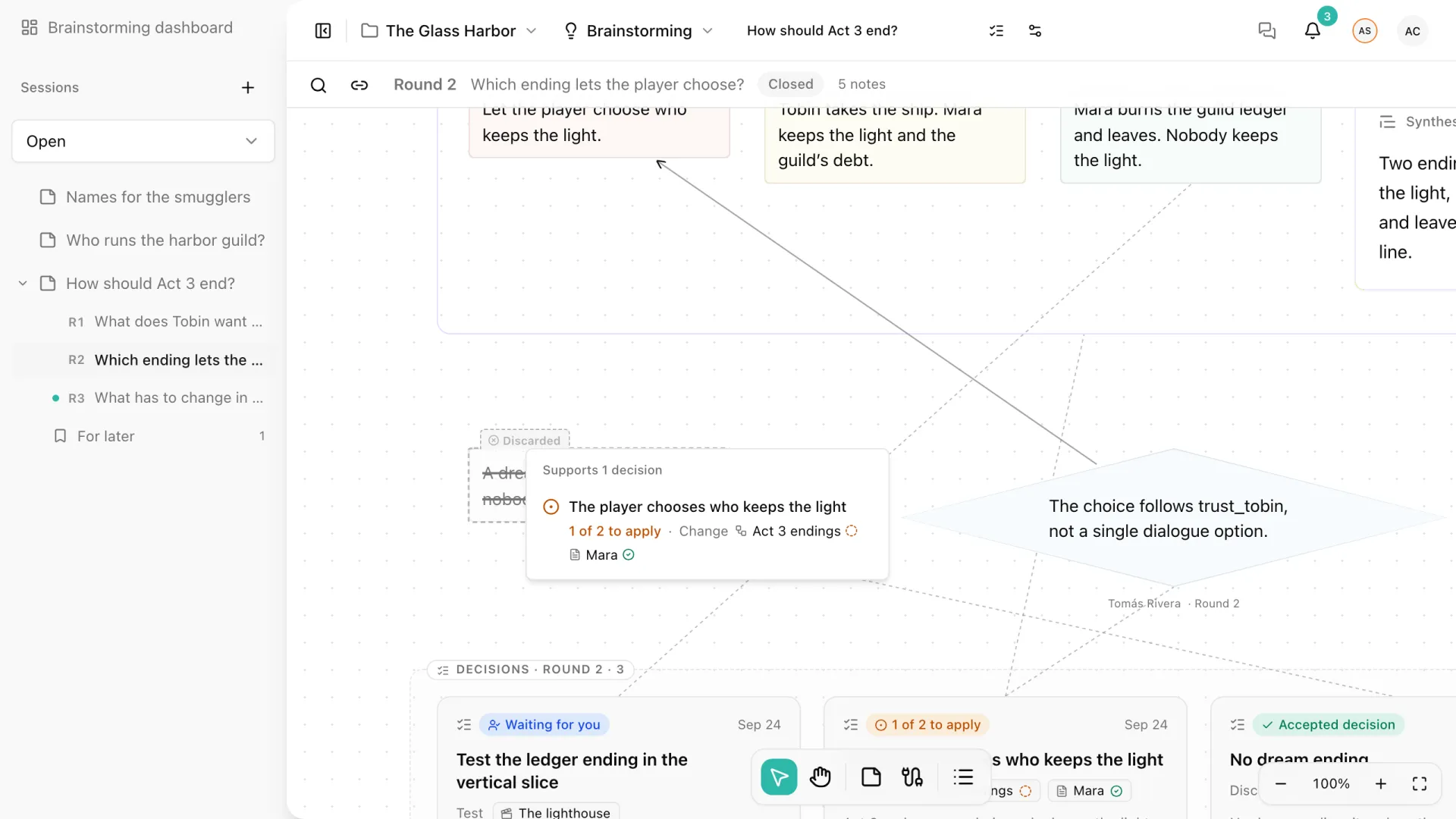
A decision belongs to the newest round among its sources.
Limits
A session can hold up to 100 decisions. Each version of a decision has between 1 and 20 sources and up to 5 affected pieces of content.