

Narrative Design
Instruction Editor
Use Builder mode and Code mode to write variable assignments for flows, responses, zones, and pins.
The Instruction Editor defines assignments that write to variables. Storyarn uses the same editor anywhere runtime logic needs to change state:
| Where | When instructions run |
|---|---|
| Instruction nodes | When the flow reaches the node. |
| Dialogue responses | When the player chooses that response. |
| Scene zones | When the zone action is triggered during exploration. |
| Scene pins | When the pin action is triggered during exploration. |
Instructions can write literal values or copy values from another variable. Use the Condition Editor when you only need to check state.
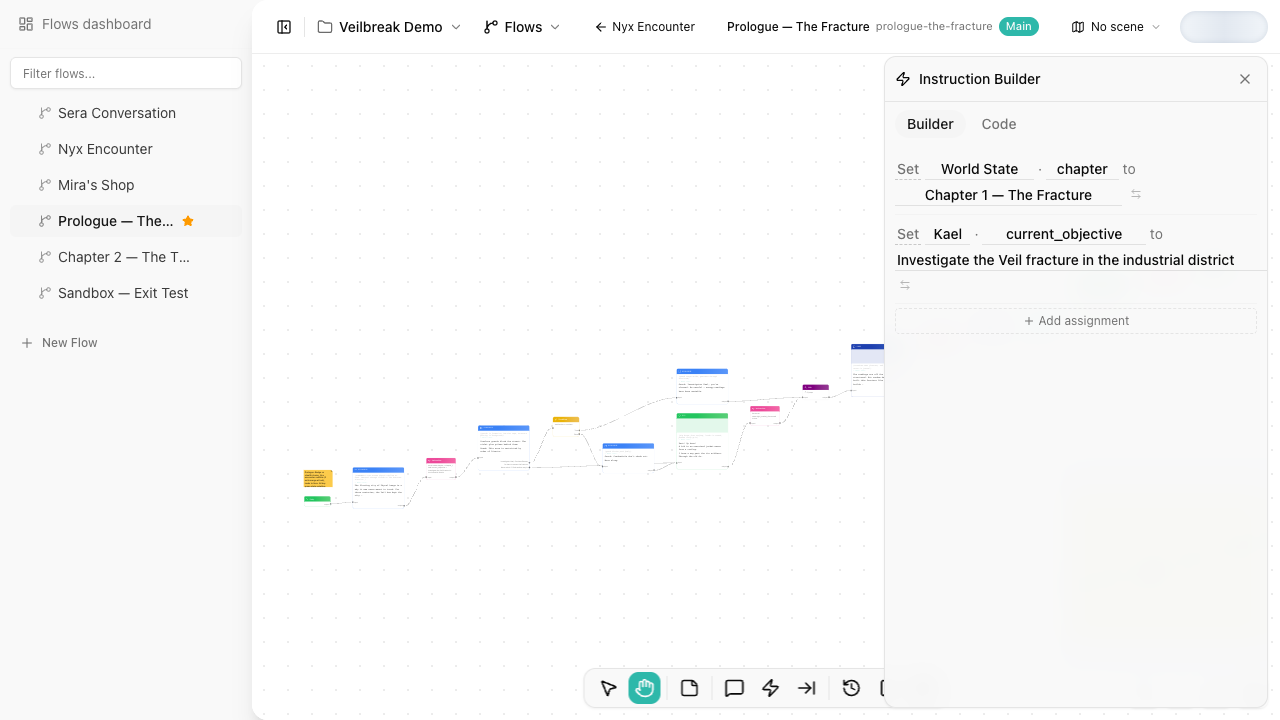
Editing modes
Every instruction set has two editing modes:
| Mode | Best for | What you edit |
|---|---|---|
| Builder mode | Most users, readable state changes, fewer syntax mistakes | Sentence-style assignment rows. |
| Code mode | Technical designers, fast edits, compact multi-line updates | One assignment per line, such as mc.jaime.gold += 100. |
Both modes edit the same assignments. Opening Code mode shows them as text and changes nothing. An edit in Code mode is read back into the rows Builder mode shows, and saved when you stop typing or leave the text. A comment (//) is refused for now: Builder mode has nowhere to keep it.
Builder mode
Builder mode reads like natural language:
Set mc.jaime · health to 75
Add 100 to mc.jaime · gold
Toggle quest.door · unlocked
Each assignment has:
- An operation.
- A target variable.
- A value, unless the operation does not need one.
A single editor can contain multiple assignments. They execute in order.
Operations
| Operation | Code mode syntax | Variable types |
|---|---|---|
| Set | mc.jaime.health = 75 | All writable types |
| Add | mc.jaime.gold += 100 | Number |
| Subtract | mc.jaime.health -= 25 | Number |
| Set true | quest.door.unlocked = true | Boolean |
| Set false | quest.door.unlocked = false | Boolean |
| Toggle | toggle quest.door.unlocked | Boolean |
| Clear | clear mc.jaime.notes | Text and rich text |
| Set if unset | quest.door.unlocked ?= true | All writable types |
The available operations depend on the selected variable type. For example, a number can be set, added to, or subtracted from, while a boolean can be set true, set false, or toggled. Set if unset writes its value only while the variable has none, such as a three-state boolean or a date that is not set, or text that Clear has emptied. A number starts at 0 and a two-state boolean starts false, and no operation they take leaves them without one, so on those it never writes. Text starts empty, so on text it writes only after Clear.
A boolean holds true or false, or, if it has three states, no value. When you set one if unset, Builder mode offers true and false to pick from. Any other value, such as 5, is refused: the variable keeps its value and Debug Mode says why in its console.
A number keeps whole values whole: adding 1 to 0 gives 1, and 0.5 + 1.5 gives 2. A value that is not a number, such as 5abc, is refused: the variable keeps its value and Debug Mode says why in its console. So is a number past the largest one a computer number holds, about 1.8 × 10^308, and an addition or subtraction whose result would be.
Literal values and variable references
Most assignments use literal values:
mc.jaime.health = 75
You can also switch the value input into variable-reference mode:
mc.jaime.health = mc.jaime.max_health
That copies the current value of max_health into health when the instruction runs.
Code mode
Code mode uses one assignment per line:
quest.tavern.accepted = true
mc.jaime.gold += 100
mc.jaime.health = mc.jaime.max_health
clear mc.jaime.notes
Numbers are written as they are, such as 75, -5 or 0.5. Any other value goes in double quotes, with \" for a quote and \\ for a backslash inside it. true and false are written bare to set a boolean, and true, false and nil to set one if unset; anywhere else Code mode refuses them, so mc.jaime.notes = nil is refused: use clear to empty a text. An assignment that has no value yet shows ?: write the value there. Each assignment takes one value: mc.jaime.health = 75 == 75 is refused.
Code mode supports autocomplete, linting, and formatting. Nothing is saved until every line reads: fix a line Code mode marks before relying on it in player, debug, or exploration mode.
While Builder mode holds a row the syntax cannot write, such as a row without a variable, a variable reference without its variable, a name the syntax cannot write, or a value with a line break, Code mode shows the assignments read-only and says so. Finish or change the row in Builder mode to edit them in Code mode.
Choosing where to put instructions
Use a dedicated Instruction node when the state change is important enough to see in the flow structure, when several values change together, or when the update should happen regardless of which dialogue response the player chose.
Use response, zone, or pin instructions when the state change belongs to that specific interaction.