

Brainstorming
Groups and Synthesis
Gather related notes in a named frame and write what they add up to, without rewriting anyone's ideas.
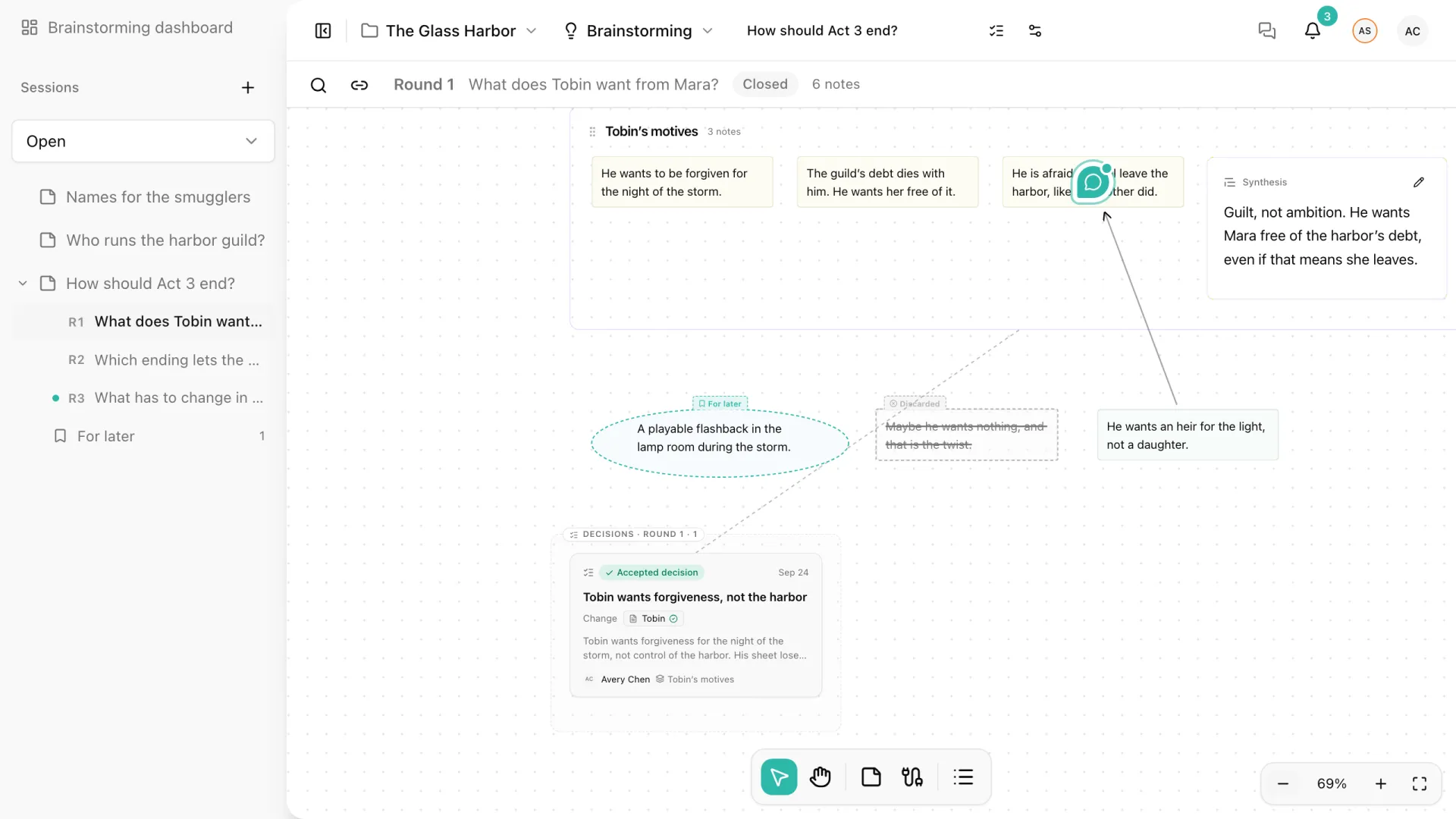
When several notes point in the same direction, group them. A group is a named frame around notes that stay where they are, with an optional synthesis: a short text in your own words about what those notes have in common. Groups are the usual step between exploring and deciding.
Create a group
- Select two or more shared notes of the same round.
- Select Group in the selection toolbar, or press Cmd/Ctrl+G.
- Give the group a title on its header.
The frame surrounds the notes in their current positions. Nothing about the notes changes: they keep their author, text, round, and connections, and can still be selected and edited one by one.
Write a synthesis
Select the group and choose the synthesis button on its header. The synthesis has its own space beside the notes, so writing it never covers what the notes say. A good synthesis states the idea the notes share in one or two sentences: “Guilt, not ambition. He wants Mara free of the harbor’s debt, even if that means she leaves.”
The synthesis is not a decision. It describes what the group found; a decision says what the team will do about it. When you are ready to agree on it, the group’s synthesis can become the starting point of a decision. See Decisions.
Move and change a group
- Drag the group’s header to move the frame and all its notes together.
- Double-click the title to rename the group, and use the pencil on the synthesis to rewrite it.
- Add to group and Remove from group in the selection toolbar change which notes belong to it, without deleting any.
- The ungroup button on the group’s header separates the notes and keeps the synthesis on the canvas as a standalone card. The delete button removes the frame and its synthesis; the notes stay.
Group changes are part of your undo history, like any other canvas action.
Rules for groups
- A note belongs to one group at a time.
- A group lives in the round of its notes. While that round is private, its groups are hidden and notes cannot be grouped until the round is revealed.
- Grouping never publishes a note or edits someone else’s text.
- Any editor can organize shared groups and edit their synthesis. Viewers can read them.